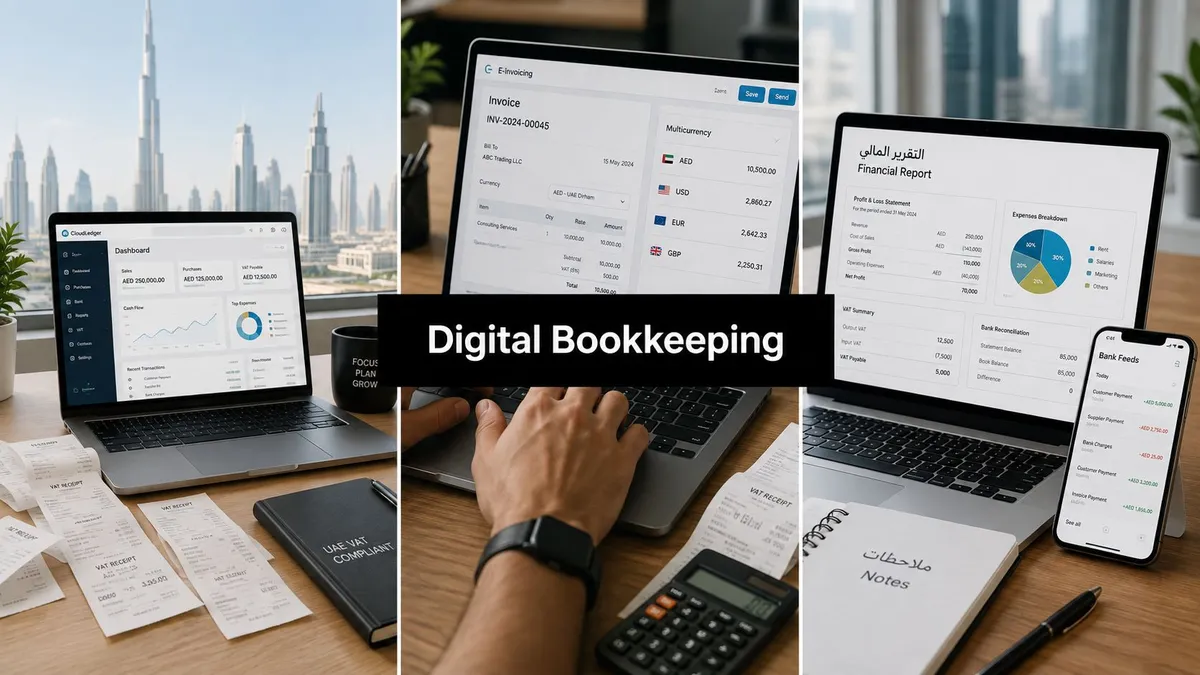
Digital Bookkeeping Solutions in UAE: 2026 Guide for SMEs
If you're still closing the month in Excel, chasing receipts in WhatsApp, and asking your team to “fix the VAT later”, you're already feeling the gap between how your business runs and how the books get done. That gap gets more expensive in the UAE because compliance isn't slowing down, transaction volume keeps climbing, and the next wave of e-invoicing will punish sloppy workflows instead of forgiving them.
For many owners, the real problem isn't whether cloud software exists. It's that the business has outgrown spreadsheets, but no one has clearly defined what the software should do, what the in-house team should own, and where a trained bookkeeper still needs to step in. That division matters more in the UAE than in many other markets, because digital bookkeeping here sits right at the junction of VAT, corporate tax readiness, bank-feed automation, and upcoming e-invoicing obligations.
Why UAE SMEs Are Moving to Digital Bookkeeping Now
A founder I recently met in Dubai had the usual setup, one spreadsheet for sales, another for expenses, bank statements in PDFs, and a part-time helper trying to reconcile everything at month-end. It worked when the business was small. It stopped working the moment invoices started landing from multiple channels, the VAT return became less forgiving, and the owner realised the numbers in the spreadsheet were always behind the bank.
That's why Digital bookkeeping solutions in UAE are no longer being discussed as a nice upgrade. They're becoming the operating layer for SMEs that need faster books, cleaner VAT treatment, and better visibility before the next filing deadline hits.
The pressure is coming from operations, not just compliance
The first pressure is the shift to e-invoicing. The Ministry of Finance rollout announced by Xero sets a clear timetable, large businesses with revenue of at least AED 50 million must appoint an Accredited Service Provider by 30 October 2026 and go live by 1 January 2027, while smaller businesses must appoint one by 31 March 2027 and go live by 1 July 2027. That makes 2026 a practical transition year, not a waiting room.
The second pressure is daily bookkeeping load. A 2024 quantitative study of UAE SMEs found 88% had adopted digital accounting systems after 2018, and the dominant platforms were QuickBooks (40%), Zoho Books (22%), Xero (18%), and SAP Business One (10%). The same study linked digitised bookkeeping with profit margin movement from 8.2% to 13.4%, alongside rising return on assets, which tells you the shift is now mainstream business infrastructure, not a niche tech choice. Study on UAE SME digital accounting adoption
The businesses that suffer most aren't the ones with no software. They're the ones with software and no disciplined review process.
The third pressure is simple scale. More card payments, more cross-border purchases, more receipts, more staff claims, and more documents in different formats all push manual reconciliation past the point of comfort. Once you see the month-end delay as a cash-flow problem, not an admin problem, the case for digitising gets a lot sharper.

What Digital Bookkeeping Solutions Actually Mean in the UAE
Digital bookkeeping isn't just “moving to cloud software”. It's a connected workflow where bank transactions flow in automatically, receipts are captured and read by OCR, the ledger updates in real time, and reports become available without a manual rebuild at month-end. A useful analogy is the jump from a paper diary to a shared online calendar. The diary only one person can update, while the calendar shows everyone the live version.
The workflow should connect, not just record
In practice, a useful setup starts with bank feeds importing transactions, then OCR receipt capture converting paperwork into coded entries, then a cloud ledger storing the live books, and finally reporting that management can read without waiting for a spreadsheet refresh. That's the flow owners should ask vendors to demonstrate, not just a dashboard screenshot.
UAE businesses need one more layer on top of that basic workflow. They need VAT-tracked invoices, multi-currency ledgers that handle AED, USD, EUR, and INR, and payroll files that can support WPS processes. If the software cannot recognise tax treatment and currency properly, the automation only speeds up mistakes.
For a practical backgrounder on cloud structures and feature comparisons, the Cloudvara cloud accounting guide is useful because it frames cloud accounting as a workflow problem, not just a software purchase.
What the UAE version must handle that generic software often misses
A UAE-ready setup should deal with local invoicing formats, exchange-rate tracking, and tax coding in the same working stream. That matters because many businesses here invoice locally, buy in foreign currency, and still need clean support for FTA-aligned reporting.
If a vendor only talks about “automation” and never shows you how VAT codes, foreign currency, and invoice status will be reviewed, you're looking at a partial system, not a full bookkeeping solution.
The phrase owners should keep in mind is working ledger, not “app”. A working ledger is one where staff can see what's posted, what's pending, what needs review, and what will hit the VAT return. That's the level of clarity UAE SMEs need before they can trust the numbers.
UAE Compliance Layers Every Digital Setup Must Cover
Many owners ask for “one system” to solve everything. In UAE accounting, that's the wrong mental model. VAT, corporate tax, e-invoicing, and record-keeping are separate layers, and each one requires a different digital capability if you want the books to stand up in real life.
VAT needs tax logic, not just invoice templates
UAE-focused guidance makes it clear that effective platforms must produce VAT-compliant invoices, calculate tax correctly, and generate filing outputs aligned to Federal Tax Authority requirements. That means the software should let you assign tax codes properly and preserve the audit trail behind those codes. If your team is still fixing VAT treatment after month-end, the workflow is already too late.
Corporate tax adds another discipline. The key issue is not just reporting profit, but making sure the underlying bookkeeping is clean enough for review. For a practical registration reference, the UAE corporate tax registration guide is a useful internal resource for owners who are still aligning entity records and tax readiness.
E-invoicing changes the timing of the whole workflow
The e-invoicing rollout matters because it shifts reporting towards real-time exchange through the Peppol network and an Accredited Service Provider model. For large businesses and SMEs, the timetable means onboarding, testing, and staff training all need to happen before the live date. Waiting until the quarter of go-live is the wrong move.
A separate compliance point is data retention for regulated entities. The CBUAE Rulebook requires strong information and accounting systems that record business activity accurately, maintain an audit trail, and protect books and customer data from unauthorised access. It also requires customer and transaction data to be stored and retained in the State for five years from creation unless another law requires longer retention. CBUAE Rulebook, Article 10
The real risk is treating compliance as a plugin
If VAT, e-invoicing, and retention are bolted on after the fact, the team ends up doing rework. If they're built into the bookkeeping process, the accounting team can catch issues before they become filing problems. That's why digital bookkeeping choices in the UAE should be judged on compliance design, not glossy interface screenshots.
For security and governance teams, the practical compliance guide for CISOs offers a useful lens on controls, access, and traceability, especially where financial records overlap with broader data governance.
Comparing the Platforms UAE SMEs Actually Use
The platforms most UAE SMEs end up using are the same names that keep coming up in local workflows, QuickBooks, Zoho Books, Xero, and SAP Business One. The right choice depends on how much VAT complexity you have, how many bank feeds you need, whether the team wants Arabic interface depth, and how much structure you need around project or entity accounting.
| Platform | VAT handling | Arabic support | UAE bank feeds | Payroll integration | Indicative monthly price (AED) |
|---|---|---|---|---|---|
| QuickBooks | Strong for standard SME VAT workflows | Limited to moderate, depending on setup | Good for common banking connections | Good for smaller teams and add-ons | Varies by plan |
| Zoho Books | Strong and flexible for UAE VAT coding | Better than many peers for bilingual usage | Solid for SME banking workflows | Good within the Zoho ecosystem | Varies by plan |
| Xero | Strong, with a clean path for Peppol-aligned workflows | Limited compared with Arabic-first tools | Good, especially where bank-feed automation matters | Depends on third-party integrations | Varies by plan |
| SAP Business One | Stronger for structured accounting and reporting control | Usually configured through implementation partners | Good in larger, more controlled environments | Typically part of a broader ERP stack | Varies by implementation |
What each platform is best at
QuickBooks is often the fastest fit for smaller firms that want a familiar interface and straightforward bookkeeping. Zoho Books usually appeals to owners who want more flexibility across invoicing, billing, and internal controls without jumping to a full ERP. Xero is a strong option for firms that want clean cloud workflows and a platform that aligns well with modern banking and e-invoicing paths. SAP Business One suits businesses that need tighter project costing, inventory control, or a more formal operational structure.
The public market picture supports that spread. In the UAE cloud accounting market, SMEs held 62.34% of revenue share in 2025, public cloud SaaS accounted for 65.42%, and invoicing and billing represented 31.73% of applications. Those numbers point to a market where owners are buying for day-to-day workflow first, not abstract analytics. UAE cloud accounting market research
Don't buy the software before you map the process
The question isn't which platform is “best” in the abstract. It's whether the business needs a bookkeeping-first tool, a billing-heavy setup, or a more controlled system with multi-entity discipline. For a broader comparison of platform fit in local practice, the cloud accounting platforms in UAE guide is worth reading before a demo day.
Migrating from Spreadsheets to a Cloud Ledger
The cleanest migration starts with the ledger, not the logo. A rushed switch usually fails because the old spreadsheet is carrying hidden duplicates, un-cleared suspense balances, and VAT coding shortcuts that no one wants to admit exist. A structured cut-over deals with those problems before the new system goes live.
The five-stage migration path that actually works
Choose the platform first. Pick the software based on the workflow you need, not on a colleague's preference. If the business is UAE-heavy and VAT-sensitive, the platform must fit the local tax pattern before anything else.
Clean historical data next. Remove duplicates, fix category errors, and reconcile the last clean bank position before import. This is the stage that saves the most pain later, because bad opening data creates bad opening reports.
Set the opening balance carefully. The trial balance as of migration date should be accurate and traceable. If the opening position is wrong, the new cloud ledger just becomes a faster way to publish an old mistake.
Connect bank feeds and payroll. Bank-feed automation is where the time savings begin. UAE-focused automation guidance reports a 60–80% reduction in daily transaction entry time for small businesses, and direct API links with banks such as Emirates NBD, FAB, ADCB, and Mashreq can bring in transactions daily or even hourly. UAE bookkeeping process automation
Run a parallel month. Keep the old system alive long enough to compare outputs. If both ledgers agree at month-end, you've got a reliable handover. If they don't, the mismatch shows where your mapping or coding still needs work.
The mistakes that usually break migrations
Duplicated transactions, uncleared suspense accounts, and VAT code mismatches are the three issues I see most often. They're not software problems by themselves. They're data problems, and they need a human to sort them before the new workflow is trusted.
A practical maintenance reference is the ledger maintenance in UAE guide, which is useful if the business is already midway through a cloud move and needs cleaner month-end discipline.
A migration succeeds when the opening numbers are boring. If they feel dramatic, something was skipped.
Where Software Stops and Human Review Begins
Automation is excellent at speed. It is not excellent at judgement. That's the distinction owners need to respect, because the software can post, match, and flag, but it can't decide whether a transaction is unusual, whether a VAT code fits a mixed supply, or whether an entry should be left in suspense until supporting documents arrive.
What software should handle every day
A good cloud setup should match bank transactions automatically, post routine FX revaluation entries, and tag standard VAT codes where the business pattern is repetitive. It should also bring invoices and payments into one view so the team can see what is open, what is settled, and what is still pending. That's where the biggest admin savings come from.
The strongest use case is repetitive work with clear rules. If a payment hits the bank and the invoice reference matches, let the system do the matching. If an expense arrives with a clean receipt and a known supplier profile, let the OCR and rule engine suggest the category.
What still needs a trained bookkeeper
A trained bookkeeper still has to review unusual entries, clear suspense balances, validate VAT treatment on mixed supplies, and sign off the month-end close. Those are not optional tasks. They're the controls that stop a tidy-looking ledger from becoming a compliance problem later.
A self-driving car handles the lane. It still needs a licensed driver for the roundabout, the construction detour, and the strange situation the software has never seen before. In accounting, the “licensed driver” is the reviewer who knows when the exception matters more than the automation rule.
Outsourcing the review layer often makes more sense than hiring more headcount, especially when the business is still learning its own transaction patterns.
That's why many SMEs pair software with outsourced bookkeeping rather than trying to make one in-house generalist do everything. The workflow stays lean, but the review layer stays accountable.
Security, Data Residency, and Vendor Selection Checklist
A bookkeeping platform is also a data custodian. Once you see it that way, the buying question changes from “which app is easiest” to “which partner can hold our books safely, prove the audit trail, and still let us exit cleanly if needed”. That's the standard owners should use in demos.
The controls you should ask about before signing
Start with data residency. If your business sits under CBUAE supervision or retains regulated records, the location of the books and transaction data matters. The next question is access control. Ask how the system handles multi-factor authentication, role-based permissions, and user-level logging, because finance data is too sensitive for shared passwords.
Then ask about encryption and backup. You want clear answers on encryption at rest and in transit, how backups are tested, and how often access logs are reviewed. If the vendor can't explain the controls in plain language, they probably can't support them well either.
The exit question is where many buyers forget to look
A strong contract should explain what happens when the relationship ends. Can you export your data in a usable format, who owns the historical records, and how long does the vendor retain the backup after termination. Those details matter more than the demo's dashboard polish.
For businesses that are still choosing between in-house and outsourced support, the hire a remote bookkeeper guide is a useful comparison point because it helps owners think about oversight, access, and operating model before they decide where the data should live.
Demo checklist for owners
- Where is the data stored: Ask for the hosting region and any residency commitments.
- Who can access it: Confirm role-based access, MFA, and approval workflows.
- How is it backed up: Request the backup schedule and restore process.
- How are changes logged: Ask to see the audit trail for edits, reversals, and approvals.
- What happens at contract end: Make sure export rights and retention rules are written down.
If a vendor can't answer those five questions cleanly, keep looking.
Your 90-Day Plan and Where Escrow Consulting Group Fits
A 90-day rollout is realistic for most SMEs if the scope stays disciplined. Weeks 1 to 2 should cover platform shortlisting, chart-of-accounts review, VAT mapping, and a decision on who will own the review layer internally. Weeks 3 to 6 should focus on data cleansing, opening balances, bank-feed setup, and payroll integration where relevant.
The middle phase is where discipline matters most
Weeks 7 to 10 should run the old and new systems in parallel, with monthly reconciliation, suspense clearing, and VAT code review happening in both ledgers until the numbers agree. That's also the point where owners should verify how the team will handle exceptions after go-live, because the first close usually reveals what the demo didn't.
Weeks 11 to 12 should be the go-live window, plus any Accredited Service Provider appointment work if e-invoicing applies to the business. For larger entities and businesses preparing early for the rollout, that timing keeps the accounting calendar ahead of the mandate instead of reacting to it.
Escrow Consulting Group fits where software stops and judgement starts. As a boutique, Chartered Accountant-led firm, it supports bookkeeping, VAT and corporate tax compliance, and cloud-based accounting for SMEs, with particular relevance for construction, property management, and service-based businesses that need a careful review layer rather than just another dashboard.
What owners should expect from the first month after go-live
The first month should not be about chasing perfection. It should be about proving that the new workflow can close cleanly, that VAT treatment is consistent, and that management can read the books without waiting for heroic spreadsheet work. If that happens, the system is doing its job.
If you want a practical migration plan, a cleaner month-end close, and a review process that fits UAE compliance rather than fighting it, speak with Escrow Consulting Group. The firm can help map your bookkeeping workflow, handle VAT and corporate tax review, and support the move from spreadsheets to a controlled cloud ledger without losing sight of day-to-day operations.